
Showing posts with label ipad. Show all posts
Showing posts with label ipad. Show all posts
Tuesday, 4 December 2012
Maximising the sound on your iPhone
If even expensive headphones are sounding"tinny" on your iPhone there are methods to correct this there are a couple of dozen easy-to-select choices for sound equalization. iOS devices have a choice of 24 available pre-selected settings. Follow our brief tutorial below to learn how to improve the sound on your iPhone and other iDevices.


Monday, 3 December 2012
Claymation comes to IPad
 |
| ClayJam on iPad |
We're sure that there have been quite a few stop motion games even on the iPad. But developer Fat Pebble has broken quite a few mobile gaming rules in creating this rather fun game.
Echoes of Katamari Damacy (on iOS?) are the first impressions with your clay ball having to roll downhill collecting smaller creatures until it is finally after many levels and upgrades ready to roll out as a massive marble of clay and take on the end of level large clay behemoth that is threatening the world of ClayJam.
There's continual progression with unlock after unlock following the acquisition of more clay. The world get's bigger the more you roll and this in turn allows you to purchase new Clay Creatures to roll up. Later unlocks being worth a great deal more clay when they succumb to your clay ball's stickiness.
The clay creatures are beautifully animated and definitely have a sense of personality behind them. The fact that they have been rendered and animated in Clay over a year long process is certainly a rule breaker from Fat Pebble but it really pay's off with a universal appeal.
As you gouge away clay to guide your ball down, aside from the lack of tactility you would honestly feel a childhood twinge at the fun to be had with playdough. Hopefully in future updates we'll see a sandbox mode and a way to build your own clay creatures on iOS.
Saturday, 17 November 2012
Little Bird flaps onto iOS
.png) |
| Little Bird App |
Where's My Water, Angry Birds, Bike Baron, Coco Loco... the list of fun physics games on smartphones has never been so populated, so is there room for another contender? Does Little Bird from Indie creator Roentgen LLC have the panache and playability to join this instant fun list of games that require just a little bit of thought (and finesse-never forget the role of finesse in physics games!)?
Well looking at the figures it seems that Little Bird by right away rolling into the list of top 50 games on the Appstore is already generating quite a following. Perhaps even the words "cult following" might already be started to be whispered in certain circles. It's quite certain that it's creator knows videogames having been an ardent arcade game follower for many years. Of course as many an app creator has found this is not nearly enough to ensure success in the mystique filled world of the appstore. However look a bit more deeply into the developer's resume and you'll see that he is also responsible for the viral video "Whack a Kitty". Not having seen the Youtube sensation we can't comment, but if the same skills that can make a video go viral are applied to an app it could certainly be a harbinger of good things to come.
 |
| 3 great ideas in 1 screenshot. Awesome! |
So skilled developer who knows what's popular, does that make for a good app?
In this case, yes! Initially the game seemed quite lacklustre, the quite chagrined looking bird morosely rolling across the first level under accelerometer control picking up a few coins on the way to an exit. An exit which naturally is best reached swiftly to get the level achievement. At this stage play on! We can't emphasise that enough, it might be a slow start but rest assured the Little Bird app has a lot of tricks up it's sleeve.
Moving on to level 2 and those tricks start to make the game shine and stand out from the normal type of physics apps. At this stage it's probably appropriate to mention the art style which is very reminiscent of PSP classic Loco Roco, cutesy, sweet and vivid pastel colours lending a great depth of fun a la Rainbow Islands to the app. On to level 2 then...
Notice the screenshot below , that basket moves. So, what exactly does that mean? It means ideas and thrills in abundance! It means that rather than rolling around the levels by tilting the iPad or iPhone under an, albeit well rendered, artificial gravity there is more... a lot more. The game is filled with little inventions and contraptions like the basket that zooms across the screen when the bird enters it, the moving platforms, the lurking creatures in dark crevices, the cannons, the...
Invention is the spice of life
 |
| Little Bird's endless inventions |
The price of admission is free and the wonderful inventions that await in Little Bird fully justifies the time that has been lavished on creating it and that will hopefully be lavished by gamers playing it.
Show your love for indie physics games at: the Little Bird Facebook Fan Page
Friday, 26 October 2012
SmartGlass on Android and IPhone
 |
| Android release date for SmartGlass |
Xbox SmartGlass is out for Microsoft's Surface tablet on October 26th, Windows Phone 8 devices will have SmartGlass on October 29th. iOS- and Android-powered devices have a long time to wait; until early 2013 to be precise.
SmartGlass is an app allowing control of Xbox 360's content with a smartphone or tablet.
What can the Smartglass App control?
Movies and music will be controllable and your device will act as a second screen to view information on actors and artists.
As a second screen idea for the 360's internet browsing it's a good idea but more exciting for gamers is the second screen function which enables your Android/ios/Windows 8 device to display secondary information like inventory and maps. The catch is that some functions need An Xbox Live Gold subscription and of course the wait for non Windows 8 phones to get the app. We're hoping that the Cyanogen or Cydia folk can hack the app and bring a cracked version of SmartGlass to Android or Ios sooner than next year.
SmartGlass is an app allowing control of Xbox 360's content with a smartphone or tablet.
What can the Smartglass App control?
Movies and music will be controllable and your device will act as a second screen to view information on actors and artists.
As a second screen idea for the 360's internet browsing it's a good idea but more exciting for gamers is the second screen function which enables your Android/ios/Windows 8 device to display secondary information like inventory and maps. The catch is that some functions need An Xbox Live Gold subscription and of course the wait for non Windows 8 phones to get the app. We're hoping that the Cyanogen or Cydia folk can hack the app and bring a cracked version of SmartGlass to Android or Ios sooner than next year.
Thursday, 25 October 2012
Medieval Logic Adventure for iPad
 |
| iLogic Hero for iPad |
If Dragons, magic and similar themes set in a logic game sound like a fun idea then it can only be driven to new heights by a studio who has previously excelled in puzzle logic games on the iPad.
The press release promises some exciting features for a wide age range of players. Naturally the Princess has disappeared and in a Grimm's Tales flavoured Cluedo type deductive game you're charged with being the heroic Knight that sets out to rescue her.
Naturally in this deductive game you won't be intervewing and grilling your standard type of criminals , but a whole menagerie of Fairytale animals need to be visited to find the missing royalty.
It's a fun concept that Marian carried out very well in their previous iLogic outing, but with the added impetus of a unique setting for a crime scene it should play out very well. As soon as iLogic Hero is available for review we'll be keeping you in the loop as to the quality of the newest Quick Logic Adventure.
Wednesday, 17 October 2012
Mobile Casino Gaming Apps
Update: Mobile casino gaming apps
Is there a mobile casino app that is compatible with my mobile device? The answer to this is now probably, yes. The online casino industry revolutionised the way we play games on our mobile, but initially games were struggling with compatibility issues and rendering incorrectly on different devices. Online casinos have had a few tricks up their sleeves recently, and the latest releases and high profile games are now readily available and compatible with most brands and OS.
What are the different options for mobile games? Apps have replaced the traditional downloadable option in the mobile sphere and compatible apps for all devices are found across the web. Certain sites also offer browser based games that render correctly on mobile devices, but these are still limited and look to improve only over time. A site like JackpotCity Online Casino is an established and trusted brand and offers players a choice of apps that suit different devices and OS options. These options are becoming more popular with the bigger sites as developers are pushing out compatible versions of the best games to keep up with demand.
The most popular slots games like Tomb Raider and Thunderstruck have made the successful transition to being available as apps, as well as a host of additional slots, blackjack, roulette and other casino-style entertainment. Thanks to software developers like Microgaming who use the mobile Spin3 technology to power mobile games, you can enjoy user-friendly navigation and functionality on most mobile devices.
Are the games compatible with all mobile devices? The answer to this is yes, the improved technology and the switch by Apple to HTML 5 means that just about any mobile device is compatible with the games on offer. The casinos stipulate the different compatibility options and the user can then choose what their preferred device will be. Find apps compatible with Apple products such as the iPhone and iPad, most tablets include the Samsung Galaxy and smart phones that include Nokia and Blackberry. Operating systems posed the biggest challenge for developers, but games can now be easily found for both the Android and Apple OS.
The apps all work really well and come highly recommended; and with the huge demand for this type of gaming it can only grow and improve to a player’s advantage.
Is there a mobile casino app that is compatible with my mobile device? The answer to this is now probably, yes. The online casino industry revolutionised the way we play games on our mobile, but initially games were struggling with compatibility issues and rendering incorrectly on different devices. Online casinos have had a few tricks up their sleeves recently, and the latest releases and high profile games are now readily available and compatible with most brands and OS.
What are the different options for mobile games? Apps have replaced the traditional downloadable option in the mobile sphere and compatible apps for all devices are found across the web. Certain sites also offer browser based games that render correctly on mobile devices, but these are still limited and look to improve only over time. A site like JackpotCity Online Casino is an established and trusted brand and offers players a choice of apps that suit different devices and OS options. These options are becoming more popular with the bigger sites as developers are pushing out compatible versions of the best games to keep up with demand.
The most popular slots games like Tomb Raider and Thunderstruck have made the successful transition to being available as apps, as well as a host of additional slots, blackjack, roulette and other casino-style entertainment. Thanks to software developers like Microgaming who use the mobile Spin3 technology to power mobile games, you can enjoy user-friendly navigation and functionality on most mobile devices.
Are the games compatible with all mobile devices? The answer to this is yes, the improved technology and the switch by Apple to HTML 5 means that just about any mobile device is compatible with the games on offer. The casinos stipulate the different compatibility options and the user can then choose what their preferred device will be. Find apps compatible with Apple products such as the iPhone and iPad, most tablets include the Samsung Galaxy and smart phones that include Nokia and Blackberry. Operating systems posed the biggest challenge for developers, but games can now be easily found for both the Android and Apple OS.
The apps all work really well and come highly recommended; and with the huge demand for this type of gaming it can only grow and improve to a player’s advantage.
Monday, 24 September 2012
Google Maps for iOS 6
 |
| Google Maps vs Apple Maps |
How to use Google Maps in iOS 6
- Go to maps.google.co.uk on your iPhone 5
- Give Google permission to use your current location by pressing okay on the notification permission .
- Add this to you iPad or iPhone's Home Screen (select the share icon in the lower menu bar and choose the "Add to Home Screen Icon", then click "Add" in the top right hand corner.
- That's it you're using Google Maps on your iPhone 5 again. The icon that you've added lets you use Google Mapping in iOS 6 if you have access to the internet.
Despite Apple putting a lot of effort into their maps app there has been an almost universal clamour against the nav enabled new addition to their iOS. Some claims have even gone as far as dubbing the app dangerous! Google Maps still provides a slicker experience, the indoor views of many locations are unparalleled and Google's multi sourced info about businesses and areas is still superior. Apple has been quick to point out that their cartography is crowd sourced and will be continually improved. The above steps to use Google Maps on an updated phone or iPad are of course temporary and Google's dedicated Mapping app is apparently going through app store approval as we speak.
Wednesday, 19 September 2012
Massive Update to Clash of Clans
 |
| Latest Clash of Clans Update ,now with Spell Factory! |
For regular and higher levelled Clanners we can now enjoy:
- The Clash of Clans Spell Factory: spells include the Rage,Lightning and Healing Spell.
- The New Battle Log is a brilliant feature. I can't wait for my village to be attacked now as I'll be able to replay the entire attack,find weaknesses in my defence and also perhaps learn some Alternative defence strategies rather than a giant or Archer rush strategy.
- Higher level town halls allow you to add an extra wizard tower to bolster up your defences even more.
- Visual improvements for upgraded troops. For example my level three archers now seem to be using fire arrows, and if you've upgraded a unit using the laboratory you'll now be able to see their rank as depicted by stars next to the unit.
- iOS 6 supported with new Game Centre achievements.
- And now for a disappointing new feature: You will now need a builder to build walls.Previously this was a builder free task, now even though the build is still instant you will have to free up one of your workers. A definite irritation factor as the higher up the levels you get the longer buildings take to construct. When you've got a lot of Gold lying about, it used to be the case that it could be spent on wall upgrades. Rather than leaving all that stored resource ready to be captured by a strong opponent.
A few other tweaks in housing , battle mechanics and other areas have also been added.
We can't wait to get that spell factory churning out some destruction and see a replayed battle in action.
Problems with Clash of Clans since the new update
Update: Since this mornings new features have been added I've found the game to be quite slow to load and the matchmaking seems slower than ever. A temporary solution for a non loading game is to just quit out and then stop the game from running altogether on your system. For example on an iPad, if Clash of Clans fails to load since the update then quit out of the game. Now double click the "Home" button and a list of recent and background running apps should come up in the tab. Long press any icon and they will all have a "minus" sign next to them. Just click that minus to stop all Clans activity and the next time you load it up it should proceed as normal. At the moment clearly there seem to be some server issues, perhaps as many people are logging on to download all the new and good stuff. For now persevere and we anticipate all problems clearing in a day or two.
Latest Info from Supercell to fix lag issues:
Supercell's official Facebook announcement as of 30 minutes ago:Maintenance break! It will fix lagging and connection issues, and we will be monitoring the situation. Thank you for your understanding and for your patience, we're working hard to get everybody back online!
Tuesday, 18 September 2012
All the features of iOS 6
 |
| All the features of iOS 6 |
All you need to know about iOS 6
Say good-bye to Google Maps, as Apple's own bespoke maps app comes online with the new operating system,Facebook becomes even more deeply embedded, and Siri will not only get some exciting updates but will now also be supported on the other suite of Apple devices rather than just the iPhone 5 (and 4S), that's right you can now use Siri on the new iPod Touch and third-generation iPad starting Wednesday.
At the moment over 200 hundred innovations,improvements and fixes are set to roll out with the update, this article will take you through some of the most important:
Maps:Google Maps will be a thing of the past for iOS, Apple's Maps application includes new vector-based 2D map elements, 3D maps, detailed traffic conditions. Finally turn by turn navigation will be available too (albeit much later than most Android Flagship phones, a handsfree future is on the cards as Siri is deeply embedded in the Apple Map app and is not reliant on the device being unlocked.
Siri: Siri will now be usable on the new iPad and iPod touch models as well as the telephone handset. Aside from the incremental improvements that would be expected Siri will also be able to voice launch applications and post to Twitter and Facebook (Samsung's S Voice already does this-does this mean a potential patent lawsuit in the future-most likely) ! Foursquare has been very much more integrated into Siri and Football results are now much easier to get-whether the Foursquare and business support for Siri migrates to the UK and the rest of the World remains to be seen.
Facebook Integration: Previously Twitter allowed easy sharing of i Device content, now Facebook follows suit and also syncs its Events with Apple's iOS Calendar.
Phone Features: We mustn't lose touch of the fact that essentially the iPhone 5 is really just a very,very sexy telephone (albeit one Alexander Graham Bell wouldn't recognise) Apple hadn't touched the general Phone feature since it was introduced in 2007 with the first iPhone. In iOS 6, Apple has created more options for users to deal with incoming calls, including options to reply with a quick message, or a reminder to be set for a certain time or a certain place.
And now for those on the move who love FaceTime but aren't always able to get to a WiFi hotspot finally mobile networks including 3G will support Facetime.
Features From OS X "Mountain Lion": Just as Google Chrome allows users to continue browsing the web through multiple device synchronisation so will iCloud and Safari enable a similar synchronization of browsing tabs across laptops,computers and different Apple devices.
Passbook: As mentioned, iOS 6's "Passbook" keeps digital tickets, coupons, loyalty cards and gift cards organized in a simple location. Passes in your Passbook can be time and location based, so if your flight gets delayed or you arrive at a Starbucks location, the user is immediately notified and Passbook is immediately launched.
Clock for iPad: Finally some basic clock function s come to the iPad with iOS6 :alarms, timers, and the ability to see the time in different places around the world. Alarms is one of the more exciting features: Users can set their alarms, but also flip the screen to see their alarms all laid out on a planning calendar. The iPad Clock can also let the user choose any song from their iTunes Library to create as their alarm, this could very well spell the demise of non Apple clock apps.
Find My Friends Optimized: "Find My Friends," which let users search and discover their iOS-owning friends on a map. In iOS 6, users can opt to receive alerts when a friend enters or leaves a certain location, which Apple calls "geofencing." In other words, if you're a worried father about his daughter's first trip to New York City for an interview, you can set up an alert to tell you when your daughter arrives in the city, and you can also alert yourself when she leaves the city, or arrives at the train station nearby. It's extremely useful for anytime people need to coordinate meet-ups, or if parents need to check on their kids' statuses when traveling.
Bluetooth Enhancements: Bluetooth is enhanced and easily accessible.
Updating Apps: No longer will you need to enter your password to update apps. The annoyance of being sent to the devices homescreen when an app download is chosen is a thing of the past too and you'll be able to stay on the Appstore and browse and download to your heart's content from that one area.
Accessibility issues addressed in iOS 6: With integration into Maps, Zoom, and AssistiveTouch, Apple is looking to help blind or low-vision users, and the company is also looking for hearing aid solutions to give its users a quality audio experience.
"New" Banners: Newly downloaded apps will be tagged with the new banner to keep track of your myriad downloads.
Other assorted features in iOS 6( for full list seethe Apple Website)
Lost Mode (Send a phone number to lost device, which can be called with single tap)
Location-based reminders for iPad
Manual location entry for reminders
Autocorrection for every keyboard
Word highlights for speak selection
HDR improvements
IPv6 support for Wi-Fi and LTE
App in Safari search results
Music ringtones
Updated sharing menu with large icons
The new and revamped Apple operating system promises some very sexy features and goes hand in hand with their improved hardware.
Many thanks to Dave Smith of the International Business Times whose original article provided much of the inspiration and research needed to write our article.
Sunday, 16 September 2012
Excelsior: Stan Lee and Apps
 |
| Stan Lee: Bringing more Heroes to iPad Apps |
Twice today doing app research I've come across the man; the legend Stan Lee, mentioned in conjunction with apps. You're going to love this article if you're a fan of Marvel, or Stan Lee and his creations and love mobile apps and games.
Interactive Apps starring Stan Lee
 |
| iPad app starring Stan Lee's Narration |
 |
| The Origin stories uses many iPad features |
It's this kind of cross genre App encapsulated Marvel magnificence that makes Stan Lee starring iPad apps so brilliant. Excelsior indeed.
BUT THERE'S MORE...
 |
| Moonshark+Stan Lee = Verticus |
Perhaps with all the Avengers excitement and Origin Stories being so popular ( the web slinger's digital story is free by the way and one of three Lee narrated digi tales: the other two being The Incredible Hulk and *tie in alert* The Avengers digital book). It's natural that this tech loving ; world and hero crafting savant is looking to do more with mobile games. Pow!Entertainment (owned by Stan the Man) has combined with a start up known as Moonshark. At the last Comikaze Expo the announcement for the Verticus Mobile game was made.
We're sure Lee's influence has been a driving force behind the creation of the future Verticus iPad game, but he has the title of official consultant for the mobile game. Not only that,but just like his narration of the Origin Stories Apps Stan Lee will become directly involved in this app, starring as the protagonist's Mission Commander.
Double Excelsior!
Enjoy the Digital Graphic Novels which are out now and keep your ear to the ground for more news of Moonshark/Pow!Entertainment's Verticus which will hopefully be released this Fall.
Tuesday, 28 August 2012
Apple Avengers Review
The Unity game Apple Avengers was hyped up in our previous article showing how good an indie Unity game could actually be. Now after a week with the IPad adventure game we're ready to deliver our gaming verdict.
Apple Avengers is good because it tries a lot and delivers a lot. Clearly a lot of thought and effort has gone into it; and that fact combined with its indie nature continues to impress.
Gameplay is paramount in this type of title and AA delivers some tight, well thought out progressive platforming.
The simple objective to find the key and free your buddy while negotiating some precision jumps; swooping platforms and a variety of enemies, is always clear and well executed. And talking of enemies,worms of course, are the main antagonists being Apple's natural predators. But ice worms, flying worms, frost worms and more will try trip you up, providing variety and a sense of lets see what's next excitement.
But other enemies abound and are contextually appropriate whether you're negotiating the desert world, frost world or any of the other varied environments.
 And to add even more variety there are different Apple Avengers that you can play as too-the Gungho Tank Apple being one of our favourites.
A great feature set that we particularly love is the fantastic throwback to old school gaming of Boss Fights being included, again varied and intense enough to make you want to play to win. So far in our short progression through the iOS game we've beaten two of the bosses, both with very definite attack patterns and solutions to beat them.

There are prettier games out there though and it is clear graphically that this is a mobile game, but the cartoonish looks combined with well designed if sparse backgrounds don't detract from the overall experience.
A word of warning though; the game is no pushover and will test your patience; it's a testament to good level design that you will carry on playing as its difficulty is progressive and never stops you from enjoying yourself.
Find Apple Avengers on the Appstore now and join the Game Center leaderboards to be the fastest player through each of the game's levels.
Apple Avengers is good because it tries a lot and delivers a lot. Clearly a lot of thought and effort has gone into it; and that fact combined with its indie nature continues to impress.
Gameplay is paramount in this type of title and AA delivers some tight, well thought out progressive platforming.
The simple objective to find the key and free your buddy while negotiating some precision jumps; swooping platforms and a variety of enemies, is always clear and well executed. And talking of enemies,worms of course, are the main antagonists being Apple's natural predators. But ice worms, flying worms, frost worms and more will try trip you up, providing variety and a sense of lets see what's next excitement.
But other enemies abound and are contextually appropriate whether you're negotiating the desert world, frost world or any of the other varied environments.
A great feature set that we particularly love is the fantastic throwback to old school gaming of Boss Fights being included, again varied and intense enough to make you want to play to win. So far in our short progression through the iOS game we've beaten two of the bosses, both with very definite attack patterns and solutions to beat them.
There are prettier games out there though and it is clear graphically that this is a mobile game, but the cartoonish looks combined with well designed if sparse backgrounds don't detract from the overall experience.
A word of warning though; the game is no pushover and will test your patience; it's a testament to good level design that you will carry on playing as its difficulty is progressive and never stops you from enjoying yourself.
Find Apple Avengers on the Appstore now and join the Game Center leaderboards to be the fastest player through each of the game's levels.
Sunday, 26 August 2012
What is the best defence in Clash of Clans?
 |
| Clash of Clans defence Guide |
Making Better Defences in Clash of Clans
 |
| Clash of Clans Guide for defences |
- Using Archer Towers: Archer Towers are even superior to Cannon when it comes to point defense, due to their superior range and ability to target both Ground and Air units. Upgrade Archer Towers to increase their firepower, but beware that your defensive turrets cannot shoot while being upgraded!
- Where is it best to use your bombs in Clash of Clans? Bombs are great to be placed a strategic choke points as to deal the most damage to the enemy or merely being placed near areas of high contention. However, Bombs are destroyed after 1 use, so replacing them may be costly. Also remember that unless you have an enormous amount of gold there are going to be weaknesses in your walls and holes in your defense. These are good areas to be defended by bombs and spring traps. You can even design your walls to funnel your enemies to these areas.
- What's a better defense than a bomb? A GIANT BOMB of course!: An Giant Bomb a cousin of the smaller and less lethal Bomb, it still is a hidden trap that becomes visible once an enemy unit walks into range, however it now deals massive AoE Damage and becomes available at Town Hall Level 6, but remember as these are only one use defenses it's not wise to base your entire defence around them as it could prove very expensive, and also if a previous enemy has triggered it you will be left defenceless until it is replaced.
- Using Cannons: Cannons are great for point defense. Upgrade cannons to increase their firepower, but beware that your defensive turrets cannot shoot while being upgraded!We recommend upgrading these as fast as possible as they have a lot of hit points and can do some serious damage
- Mortars: Strengths:
- Mortars are great against clusters of weak troops, so it is to your benefit to keep all Low HP units away from their destructive blasts.
- Weaknesses:
- Mortars are easily countered by High HP units, such as the defense destroying Giant, because they're AoE attacks are slow and do not deal significant Damage.
- Air Defense: Costly to build and upgrade but when an enemy starts coming at you with Balloons they're going to be crucial
- Pumpkin Bombs: The Halloween Update adds a bit of seasonal flavour to your defence.
- Hidden Tesla: Again higher levels can use a mysterious new defence-the Hidden tesla styas invisible until it's area defence becomes necessary (talking about high levels have you upgrdaded to the Dark castle yet?)
- X-Bow: Level nine town halls can now use the rapid elixir bolt firing X-bow-it can be used to either just fire on ground units at longer range or for a shorter range X-Bow attack you can take on both air and ground units.
Remember walls don't need builders, so use spare cash to upgrade and build them whenever possible. A wall will slow down an enemy allowing your defences to pick them off.
 |
| Use walls wisely and remember to keep upgrading your defense. |
Layer your defences: An archer tower is great, but lacks the hit points of a cannon so keep them within the fire radius of the other defences. A mortar while mightily powerful at rang can not via in its immediate vicinity, so keep its location protected.
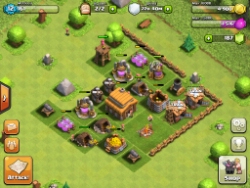 |
| Good Town Hall Placement, but weak defences will soon be overrun |
During the various stages of the game you might decide that it is more important to protect your gold/elixir storage or the Town Hall. Layer your defences accordingly, if the Town Hall is surrounded by other buildings these will be taken out and you will lose your resources-but the enemy still might lose the battle because their forces have been eroded taking out other buildings.
Keep your defences topped up, Spring Traps, Bombs etc. at the lower levels are only one use defences, if you've been attacked the make sure that you rebuild what has been lost.
Looking forward to bringing the fight to you, I'm BombDaddy77 and currently don't have a clan, so come and face off and lets see if this guide has improved your play!
Thursday, 23 August 2012
Minecraft Pocket Edition :Guide to Crafting, smelting and harvesting.
Our Minecraft Pocket Edition Guide continues to be popular and since the recent update that brought crafting, smelting and harvesting to Minecraft PE we've decided to do some research and bring you some more hints and tips about how to use the new smelting , crafting abilities and more. The Guide to Minecraft Advanced Touch Technology Interface System (MATTIS) crafting system.
Minecraft Pocket Edition Updates you need to know about:
There are now furnaces-this guide will allow you to get to know how to use the Minecraft Furnaces better,
Also look out for
Crafting - blocks
In the world of Minecraft, you can make most objects by crafting. Simply enter your inventory and then hit the 'craft' button in the top corner. If an object's name is written in white, it means you have the materials to make it.
Tap on the big ingredients list box on the right to craft the item, and instantly add it to your inventory.
Of course a crafting table is also necessary for some of the bigger and more elaborate objetcts. Some examples of forthcoming objects that Notch's game might reference but aren't available yet:cakes, mushroom stew, fish.
Minecraft pocket Edition Crafting Recipes
How to craft tools and weapons in Minecraft Pocket
Crafting - survival gear
Crafting - decorative items
What is Smelting?
Here is where the new furnace update becomes important, just select the furnace to bring up the smelting menu this will allow new objects to be created by melting down other objects.
What Fuels should I use for Smelting?
Tap the top-most box, and then choose one of the highlighted materials from your inventory on the left of the screen. Then, tap the box below and pick one of your fuels. Some fuels are more effective than others - be creative with your use of fuels something like coal will burn for a long time, but sticks not so long.
You need to provide enough fuel so that the material completely melts (represented by the arrow that changes from grey to white) before your fuel is used up. You can put in a lot of fuel, and you can collect any leftovers when the smelting process is over.
Where to find Natural materials (clay,iron ore etc.)
You'll need to find those resources in the wild.
The list below will help you find those naturally occurring materials in your random Minecraft world.
Minecraft Pocket Edition Updates you need to know about:
There are now furnaces-this guide will allow you to get to know how to use the Minecraft Furnaces better,
Also look out for
- Trees now drop saplings.
- You can now craft glass panes (or thin glass).
- All resources can now be gathered(except redstone, try to mine redstone and it simply gets vapourised).
- Full crafting of weapons and tools.
- Look forward to crafting iron, gold ,lapis lazuli and diamond blocks.
- You can place ores using the Creatives Menu
- Also look out for Bows and drops from chickens, skeletons and spiders (feathers;arrows/bones and string respectively)
- Now Bone meal can be crafted too (for use on Saplings in Mojangs Top Game)
Crafting - blocks
In the world of Minecraft, you can make most objects by crafting. Simply enter your inventory and then hit the 'craft' button in the top corner. If an object's name is written in white, it means you have the materials to make it.
Tap on the big ingredients list box on the right to craft the item, and instantly add it to your inventory.
Of course a crafting table is also necessary for some of the bigger and more elaborate objetcts. Some examples of forthcoming objects that Notch's game might reference but aren't available yet:cakes, mushroom stew, fish.
Minecraft pocket Edition Crafting Recipes
| Outcome | Description | Recipe |
 | Brick Stairs - compact brick staircases |  (6) (6) |
| Bricks - decorative building block |  (4) (4) |
 | Bricks Slab - used for making long staircases | (3) |
 | Clay - decorative building block |  (4) (4) |
 | Cobblestone Slab - used for making long staircases |  (3) (3) |
 | Crafting Table - allows you to craft a more varied selection of items |  (4) (4) |
 | Fence - a barrier that certain enemies can't jump over |  (6) (6) |
 | Fence Gate - an openable gate for your fence | (2) (4) |
 | Furnace - allows you to use the smelting menu | (8) |
 | Glass Pane - decorative window for your buildings |  (6) (6) |
 | Ladder - allows you to climb vertically | (7) |
 | Sandstone - decorative building block |  (4) (4) |
 | Snow - a compact way to store snowballs |  (4) (4) |
| Stick - used to make tools, weapons, and other objects | (2) |
 | Stone Slab - used for making long staircases |  (3) (3) |
 | Stone Stairs - used for compact staircases | (6) |
 | Wooden Door - a door that opens and closes when hit | (6) |
| Wooden Planks - useful building material for weapons and tools |  (1) (1) |
 | Wooden Slab - used for making long staircases | (3) |
 | Wooden Stairs - used for compact staircases | (6) |
 | Blue Wool - decorative building block |  (1) (1)  (1) (1) |
 | Yellow Wool - decorative building block | (1)  (1) (1) |
How to craft tools and weapons in Minecraft Pocket
| Outcome | Description | Recipe |
 | Arrow - ammunition for bows | (1)  (1) (1) (1) (1) |
 | Bone Meal - fertiliser for crops, and used in dye recipes |  (1) (1) |
 | Bow - used for long-ranged attacks when used with arrows | (3)  (3) (3) |
| Dandelion Yellow - used as a dye |  (1) (1) |
 | Diamond Axe - a fast way to chop wood-related blocks |  (3) (2) (3) (2) |
 | Diamond Pickaxe - a fast way to mine stone, and required to mine certain types of ore | (3) (2) |
 | Diamond Shovel - a fast way to dig, and used to collect snow | (1) (2) |
 | Diamond Sword - an offensive weapon to deal with enemies | (2) (1) |
 | Golden Axe - a fast way to chop wood-related blocks |  (3) (2) (3) (2) |
 | Golden Pickaxe - a fast way to mine stone, and required to mine certain types of ore | (3) (2) |
 | Golden Shovel - a fast way to dig, and used to collect snow | (1) (2) |
 | Golden Sword - an offensive weapon to deal with enemies | (2) (1) |
 | Iron Axe - a fast way to chop wood-related blocks |  (3) (2) (3) (2) |
 | Iron Pickaxe - a fast way to mine stone, and required to mine certain types of ore | (3) (2) |
 | Iron Shovel - a fast way to dig, and used to collect snow | (1) (2) |
 | Iron Sword - an offensive weapon to deal with enemies | (2) (1) |
 | Stone Axe - a fast way to chop wood-related blocks | (3) (2) |
 | Stone Pickaxe - a fast way to mine stone, and required to mine certain types of ore | (3) (2) |
 | Stone Shovel - a fast way to dig, and used to collect snow | (1) (2) |
 | Stone Sword - an offensive weapon to deal with enemies | (2) (1) |
 | Wooden Axe - a fast way to chop wood-related blocks | (3) (2) |
 | Wooden Pickaxe - a fast way to mine stone | (3) (2) |
 | Wooden Shovel - a fast way to dig, and used to collect snow | (1) (2) |
 | Wooden Sword - an offensive weapon to deal with enemies | (2) (1) |
| Lapis Lazuli - used as a dye |  (1) (1) |
 | Shears - used to take wool from sheep, and makes placeable leaf blocks | (2) |
 | Torch - lights up dark areas, and melts snow and ice |  (1) (1) (1) (1) |
Crafting - survival gear
| Outcome | Description | Recipe |
 | Bowl - will be used to hold mushroom stew | (3) |
 | Sugar - will be used in the cake recipe |  (1) (1) |
Crafting - decorative items
| Outcome | Description | Recipe |
 | Block of Diamond - a compact way to store diamond ore | (9) |
 | Block of Gold - a compact way to store gold ore | (9) |
 | Block of Iron - a compact way to store iron ore | (9) |
 | Book - used to create bookshelves |  (3) (3) |
 | Bookshelf - a decorative item | (6) (3) |
| Diamond - used to create strong weapons and tools | (1) |
| Gold Ingot - used to create strong weapons and tools | (1) |
| Iron Ingot - used to create strong weapons and tools | (1) |
| Lapis Lazuli Block - a compact way to store Lapis Lazuli | (9) |
| Paper - used to make books | (3) |
What is Smelting?
Here is where the new furnace update becomes important, just select the furnace to bring up the smelting menu this will allow new objects to be created by melting down other objects.
What Fuels should I use for Smelting?
Tap the top-most box, and then choose one of the highlighted materials from your inventory on the left of the screen. Then, tap the box below and pick one of your fuels. Some fuels are more effective than others - be creative with your use of fuels something like coal will burn for a long time, but sticks not so long.
You need to provide enough fuel so that the material completely melts (represented by the arrow that changes from grey to white) before your fuel is used up. You can put in a lot of fuel, and you can collect any leftovers when the smelting process is over.
| Outcome | Description | Recipe (add fuel) |
| Brick - used to make brick blocks | |
| Glass - used to make windows | |
| Stone - decorative building block, used to make stone slabs | |
| Diamond - used to create strong weapons and tools |  |
| Gold Ingot - used to create strong weapons and tools |  |
| Iron Ingot - used to create strong weapons and tools |  |
| Lapis Lazuli - used to dye wool blue |  |
 | Charcoal - used to make torches, and is also a fuel | |
 | Green plant - will be used to dye wool green |  |
Where to find Natural materials (clay,iron ore etc.)
You'll need to find those resources in the wild.
The list below will help you find those naturally occurring materials in your random Minecraft world.
| Where to find the different materials and what they do the Material | Description |
| Clay balls - rare material, found in sand and sometimes underwater. Best harvested with a shovel |
| Cobblestone - common material. Dig down into the earth if you're struggling to find some. A pickaxe is needed to harvest cobblestone |
| Sand - very common material, found by water |
| Snowball - use a shovel on snow to make snowballs |
| Wood - punch trees to collect wood. Comes in brown and white varieties, but they can be used interchangeably while crafting |
| Wool - use shears on sheep to obtain wool. It can be dyed to make different colours |
| Feather - use any tool or weapon to kill a chicken to produce feathers |
| Flint - sometimes produced when mining into gravel |
| Bone - skeletons sometimes drop these when killed |
| String - spiders drop these when killed |
| Dandelion - natural flowers that blossom randomly throughout the world |
| Gold ore - found deep beneath the ground. Requires a powerful pickaxe to successfully mine |
| Diamond ore - found deep beneath the ground. Requires a powerful pickaxe to successfully mine |
| Iron ore - often found slightly beneath the ground. Requires a powerful pickaxe to successfully mine |
| Lapis ore - extremely rare material, found deep beneath the ground. Requires a powerful pickaxe to successfully mine |
 | Coal - mined from coal ore blocks |
| Sugar cane - natural plant, found throughout the world Many thanks to Pocket Gamer for their useful crafting guide which we have researched and adapted further. |
Subscribe to:
Posts (Atom)